
Roles & Permissions let you decide exactly what each of your admins can do. Instead of giving everyone full access, you can create custom roles that unlock only the parts of the app manager a person needs — and even limit a role to specific bargaining units, groups, or locations.
Two kinds of roles
- Built-in roles — Administrator (full access to your local) and Content manager (manage all content and your local’s settings, but not members, devices, or roles). These are fixed — you can’t edit or delete them. See User Roles for what each one includes.
- Custom roles — roles you create yourself, made up of exactly the capabilities you choose. Use them to give someone narrow access, like an “Events editor” who can only manage events, or a bargaining-unit steward who can only post news to their own unit.
Finding Roles & Permissions
- Login to the app manager
- Go to Local → Edit local (or choose Union Settings from the menu under your local’s name, top right)
- Click the Roles & Permissions tab
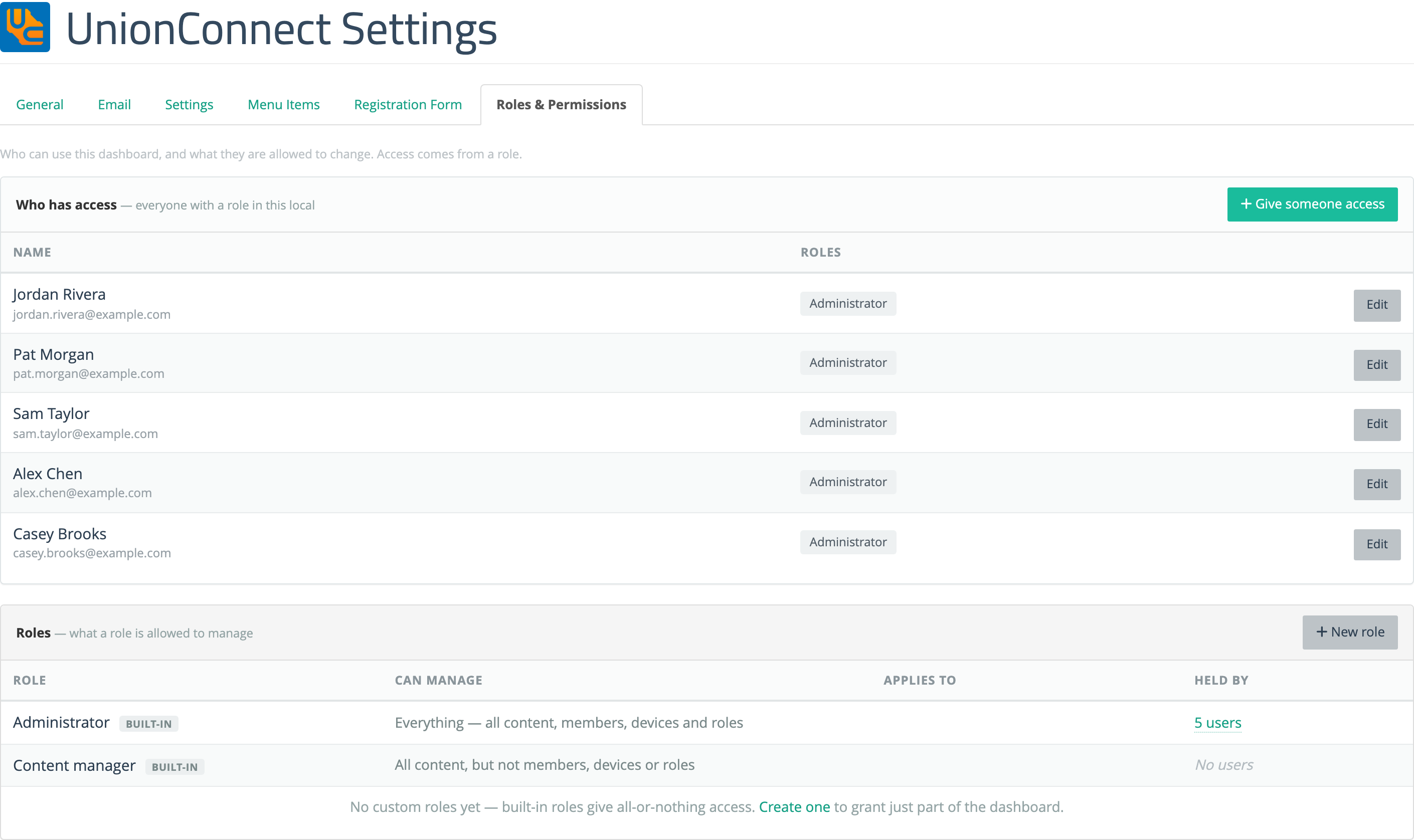
The page has two tables. Who has access lists everyone who holds a role in your local, with their roles and an Edit button; use Give someone access to assign a role to someone new. Below it, the Roles table lists every role, built-in and custom, with what it Can manage, who it Applies to (all members, or specific audiences), and who it’s Held by. Click the number of users in Held by to filter the Who has access table to that role. Custom roles have Edit and Delete buttons; built-in roles are marked built-in and can’t be changed.
Only admins with the Local Settings capability (which includes full Administrators) can see this tab and manage roles.
What each member sees
A person only sees the parts of the app manager their roles allow — everything else is hidden, not just disabled. For example:
- Without Push Notifications, the Push Notifications menu item and every “send” and bell button disappear.
- Without Users & Devices, the Users and Devices section disappears, along with the ability to manage member accounts and devices.
- Without Local Settings, Union Settings (Edit local) and this Roles & Permissions tab disappear, and the person can’t assign roles.
- Without a content capability (News, Events, Info & Resources, Directories, Contracts, People Database), that section and its tabs disappear.
- A role limited to specific audiences only sees content for those bargaining units, groups, or locations, and its Edit/Delete buttons appear only on records it’s allowed to touch.
Next steps
- Creating & Editing Custom Roles — build a role step by step.
- Capabilities Reference — what every capability unlocks.
- Assigning Roles to Members — give a role to one or more people.